The document, before you run it. A section from a fictional tenant.
This page shows part of a document the way the portal, the PDF and the Word file print it, built from the run of a fictional organization, so every name and number in it is made up. Your document has the same parts with your tenant’s settings.
The first page says what the rest contains.
The tenant, the date and the person who ran it, the count of sections, pages and diagrams, and a paragraph written from the facts. With the MSP plan, the cover carries your name and logo and a “prepared for” line for the client.
State of the tenant
ExampleContoso, as built on November 3, 2026.
Contoso has 412 users, 388 of them licensed and 24 not. Mail enters through one third-party gateway and leaves directly from Exchange Online. Sign-in is governed by 23 Conditional Access policies, 19 of them enabled. 297 devices are managed under 6 compliance policies.
10 sections, 31 pages, 6 diagrams. Run by Dana Ruiz.
3. Sign-in and access
Every section opens with its figure, then a description, then the settings as tables.
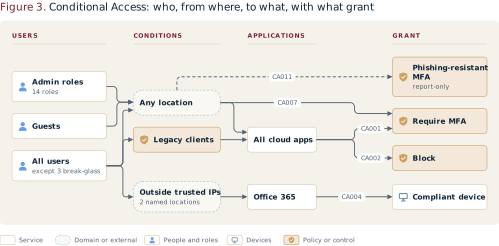
Contoso has 23 Conditional Access policies. 19 are enabled, 3 are report-only and 1 is off. Every enabled policy that applies to all users requires multifactor authentication or a compliant device; administrators must sign in from a compliant device; guests are blocked outside the named locations.
| Policy | Applies to | Grant | State |
|---|---|---|---|
| Require MFA for all users | All users | Require multifactor authentication | Enabled |
| Administrators on compliant devices | Directory roles | Require compliant device | Enabled |
| Block guests outside named locations | Guest users | Block | Enabled |
| Legacy authentication | All users | Block | Report-only |
Not collected: Privileged Identity Management settings. The sign-in did not hold the permission to read them. The appendix lists this note.
What changed since the last document.
The change log closes every document made after a first one.
Change log, October to November
Example- Require MFA for administrators3 Sign-in and accessAdded
- Inbound connector from the gateway4 Mail flowChanged
- Legacy mobile device policy7 DevicesRemoved
The PDF and the Word file
The PDF and the Word file are the same content as the pages: the cover and summary, the ten sections with their figures, and the appendix, closed by the as-built statement. The PDF is A4, with a linked contents and bookmarks; the Word file has styles and a contents field and is made to be edited.
Open the sample document (PDF) Open the Preview PDF, with its band
Both are built by the portal’s own code from the run of a fictional organization. The Preview PDF shows what the free plan produces: the summary, section 1 in full, and the headline tables and diagrams of the rest.
See the document of your own tenant today.
The free Preview runs up to 2 times on one tenant: the summary, section 1 in full, and the headline tables and diagrams of the rest. Decide with your own tenant in front of you.